MCP: give the agent access to your tools
Connect GitHub, Notion, Linear, Stripe, Figma or any MCP server so the agent can read your tickets, designs or documents while it builds your site.
On this page
MCP (Model Context Protocol) is a standard way to give an AI access to a tool: your GitHub account, your Notion pages, your Linear tickets, your Figma designs. Once an MCP server is connected to your project, the agent can, for example, read the brief stored in Notion or pick up the colors from a Figma design while it builds your site.
Add a server
- Open Dashboard › MCP, then the Project MCP servers card.
- Click Add a server.
- Choose the Server: Project files, Fetch (web pages), GitHub, Notion, Linear, Stripe, Figma, Shopify (docs and API), or Other (address) for a remote server.
- Keep or change the Name (lowercase letters, digits and
_). This is the name the agent uses. - Paste the key it asks for (for example a GitHub or Notion token). Documentation opens the page that explains how to get one. The Project files and Fetch servers don't need one: they run inside your project's environment.
- Click Add.
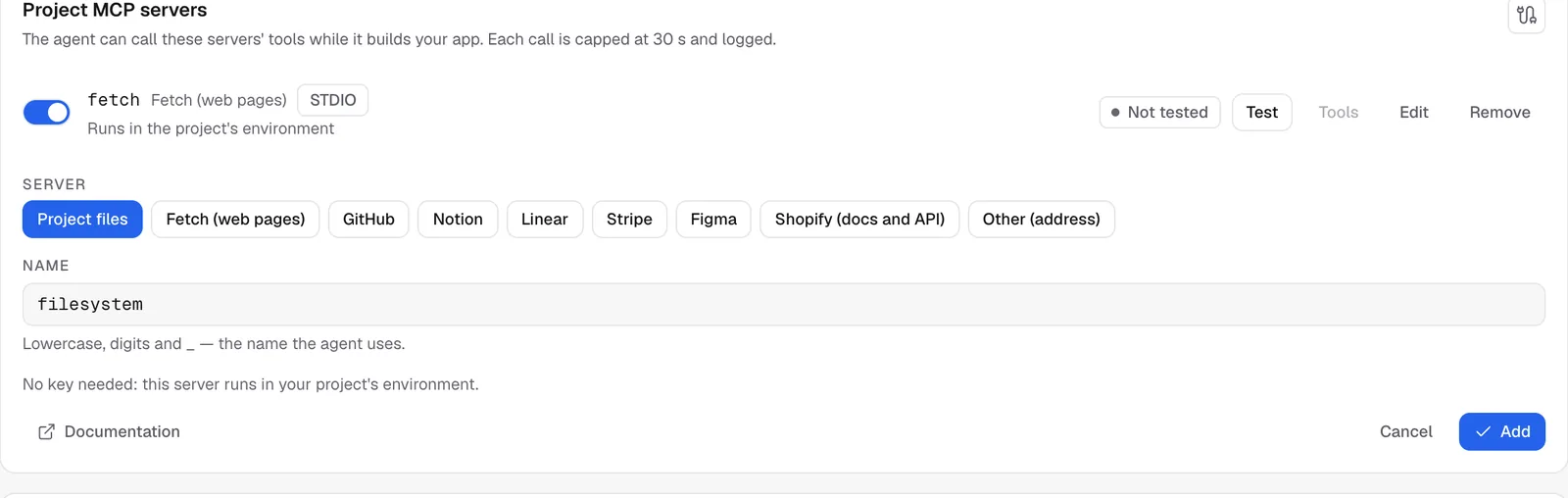
For Other (address), enter the Server address (starting with https), the Protocol and, if the server requires it, the Auth header and its Value.
Test it and choose the allowed tools
- On the server's row, click Test. The first connection can take up to a minute.
- If it works, the badge changes from Not tested to the number of tools found.
- Click Tools and tick the ones the agent may use (All, None, or one by one).

Tip
only allow the tools you need. For a GitHub server, reading issues is often enough. Leave out the ones that delete or change things.
The test needs your project's preview to be running. The switch pauses a server, Edit changes its key, and Remove deletes it.
Ask the agent to use it
Just mention the tool in your message:
Read the Notion page "Website brief" and suggest a plan for the pages that are missing.Keys are encrypted, never shown again and never shown to the agent. Each call is limited to 30 seconds. The Recent calls card lists the time, server, tool and result of every call, but not their content.
Limits
- 10 servers per project.
- Only the servers on offer and remote servers over
httpsare accepted. Private or internal addresses are refused. - Calls go through the agent: they count toward the current message, like its other actions.
FAQ
The test fails.
Check the key (it needs enough permissions and must not be expired), then try again. For an Other (address) server, check that it supports the protocol you chose.
Do my visitors have access to these tools?
No. These servers are for the agent while it builds your site. If you want the opposite, making your app usable by an AI, see Expose your app over MCP.
Related
Was this page helpful?
Thanks for your feedback!
Couldn't send your feedback. Please try again later.