Autonomous agents: let the agent work on its own on a schedule
Schedule the agent to write a visitor summary every Monday, check your SEO monthly or follow up on abandoned carts in your shop, hands-free.
On this page
An autonomous agent is your project's agent, started automatically on a schedule with a fixed set of instructions. It works without you: it doesn't ask questions, does the job you gave it, and ends with a summary that you'll find in the project's chat.
Start from a template
- Open Dashboard › Agents, then the Autonomous agents card.
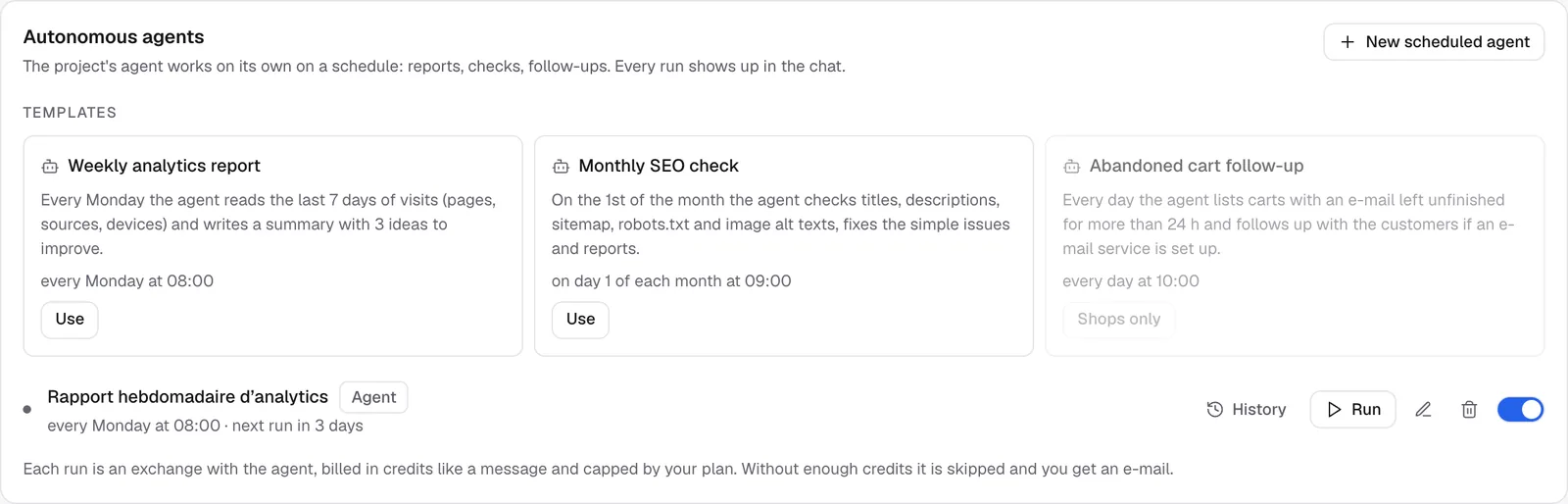
- Under Templates, pick one and click Use:
- Weekly analytics report (every Monday at 8 am): the agent reads the last 7 days of visits (pages, sources, devices) and writes a summary with 3 ideas to improve;
- Monthly SEO check (the 1st of each month at 9 am): titles, descriptions, sitemap,
robots.txtand image alt texts. It fixes the simple problems and sums up what it did; - Abandoned cart follow-up (every day at 10 am, Shops only): it lists the carts left unfinished for more than 24 hours and follows up with the customers if an email service is set up.
- Adjust the instructions or the time if you like, then save.
For the first two templates, FromScratch itself adds your visit numbers or your latest SEO analysis to the instructions, so the agent works on your real data.
Write your own instructions
- Click New scheduled agent.
- Give it a name and write the Instructions, like a message to the agent, but a complete one: it can't ask you for details later.
- Choose when it runs (Schedule or Interval), then save.
Example:
Check that every page looks good on mobile and fix anything that overflows. Finish with the list of pages you fixed.Follow and manage an agent
Each run appears in the project's chat, marked with "[Automation · agent name]", and creates a version just like a normal message. If you don't like a change, you can go back (see Versions: undo anything).
On the agent's row you'll find: History (the runs and what they cost), Run (start it right now, after a confirmation), the pencil, the trash can, and the switch to pause it.
Note
an agent that changes your site changes the preview. To put the changes on your live site, check the result and then Republish.
Credits and limits
- Each run is an exchange with the agent: it's billed in credits like a message and capped by your plan.
- If you don't have enough credits, the run is skipped and you get an email.
- If a message is already in progress in the project, the run is skipped.
- A scheduled agent runs at most once an hour.
- Agents count toward the project's 10 automations.
FAQ
What's the difference with an automation?
An automation performs a fixed action (a request, a webhook, an email) with no AI and no credits. An autonomous agent thinks, reads your data and can change your site, but it uses credits.
Can the agent publish by itself?
No. It works on the preview. Publishing is always your decision.
Related
Was this page helpful?
Thanks for your feedback!
Couldn't send your feedback. Please try again later.