Create a mobile app for iPhone and Android
Start a « Mobile app » project, see it in a phone frame right away and let the agent build a real iPhone and Android app with Expo.
On this page
FromScratch can build a real mobile app, the kind you install on an iPhone or an Android phone, not only websites. You describe your app in the chat, the agent builds it, and you watch it run in a phone frame next to the conversation. When you are happy with it, you try it on your own phone, then build it and publish it on Google Play and the App Store from the project's dashboard.
Start a mobile app project
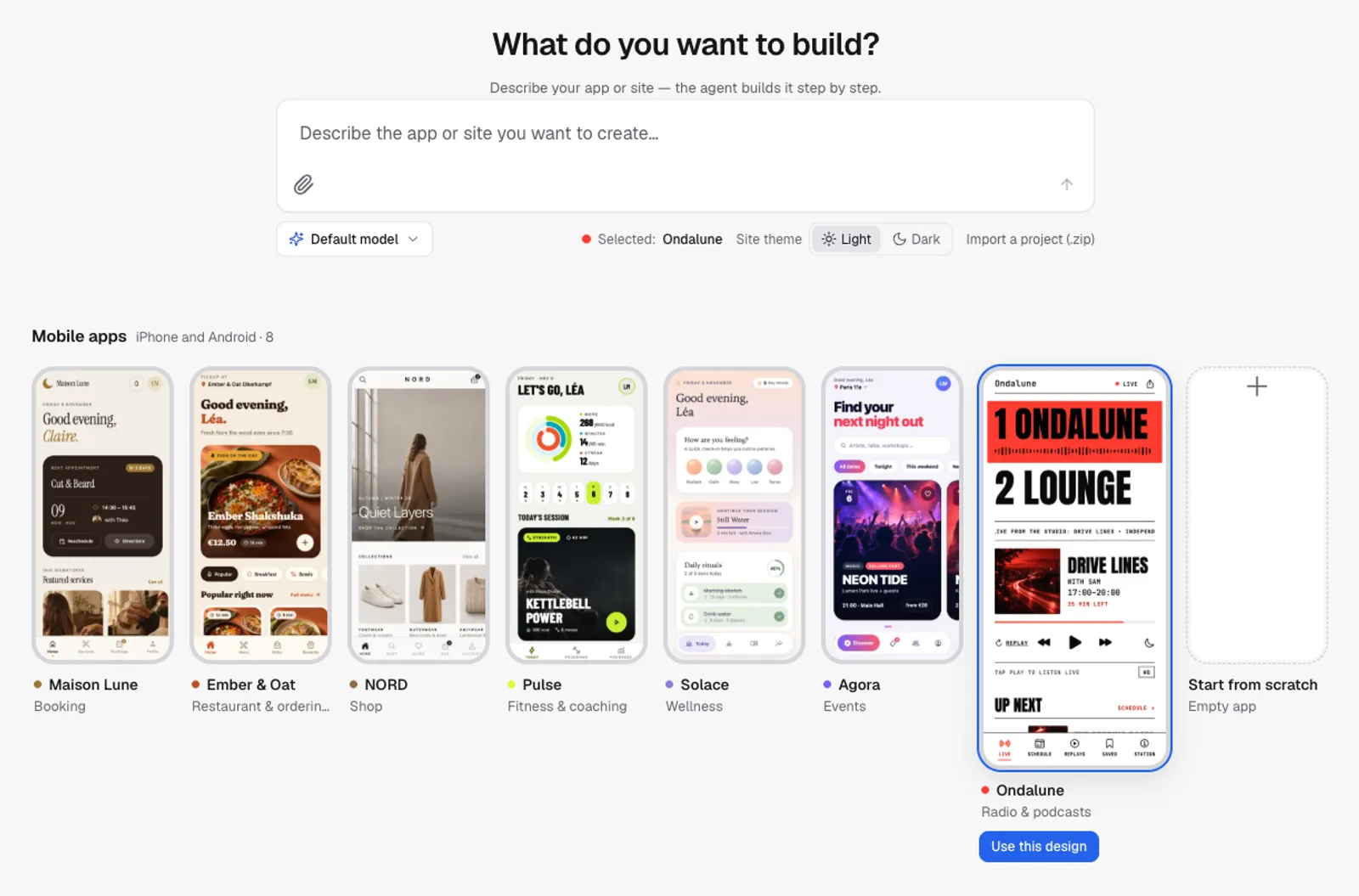
- On the Home page, under the prompt box, scroll to the Mobile apps row (« iPhone and Android »). Use the arrows to browse it.
- Click one of the seven designed apps, or Start from scratch at the end of the row for a clean, empty app. The card grows: click Use this design (or Create an empty app).
- Describe your app in the box under « What do you want to build? » and send.
| Design | Kind of app | What’s inside |
|---|---|---|
| Maison Lune | Booking | Services, team, time slots and appointments for a salon or barber |
| Ember & Oat | Restaurant & ordering | Menu with photos, order ahead, order tracking and a loyalty card |
| NORD | Shop | Catalogue, product pages, sizes, wishlist and bag |
| Pulse | Fitness & coaching | Today’s workout, programs, a workout timer and progress |
| Solace | Wellness | Meditation, daily habits, mood and journal |
| Agora | Events | Event listings, tickets with QR codes and a community feed |
| Ondalune | Radio & podcasts | Live player with HD and data-saver streams, now playing, weekly programme, replays and podcasts, favourites and a sleep timer — see Web radio app: connect your stream |
Each design is a complete app with demo content: real screens, photos, texts and buttons that already work. You then customise it by chatting: your name, your colours, your services or products, the screens you need or don’t. Start from scratch gives an empty app (a welcome screen and a settings screen) that the agent builds entirely from your description.
Once a design is selected, the Site theme switch next to the prompt (Light / Dark) shows its card in either colour mode. It doesn’t lock your app in one mode: every design comes in both, and the app follows the light or dark setting of the phone it runs on.
The project opens like any other: the chat on the left, the preview on the right. The first launch installs the app's building blocks, which takes 1 to 2 minutes (« Starting the mobile app… »). After that, every change shows up within a few seconds.
A loyalty card app for my bakery "Pain d'Or": a home screen with my points and a progress bar, a screen with this week's specials, and a screen with our address, opening hours and a button to call us. Warm colours, in French.What you see
The preview shows your app inside a phone frame, sized like an iPhone. The two buttons on the right of the preview bar switch between the phone frame and a desktop-width view. The On my phone button opens a QR code to try the app on your own phone: see Try your app on your phone.
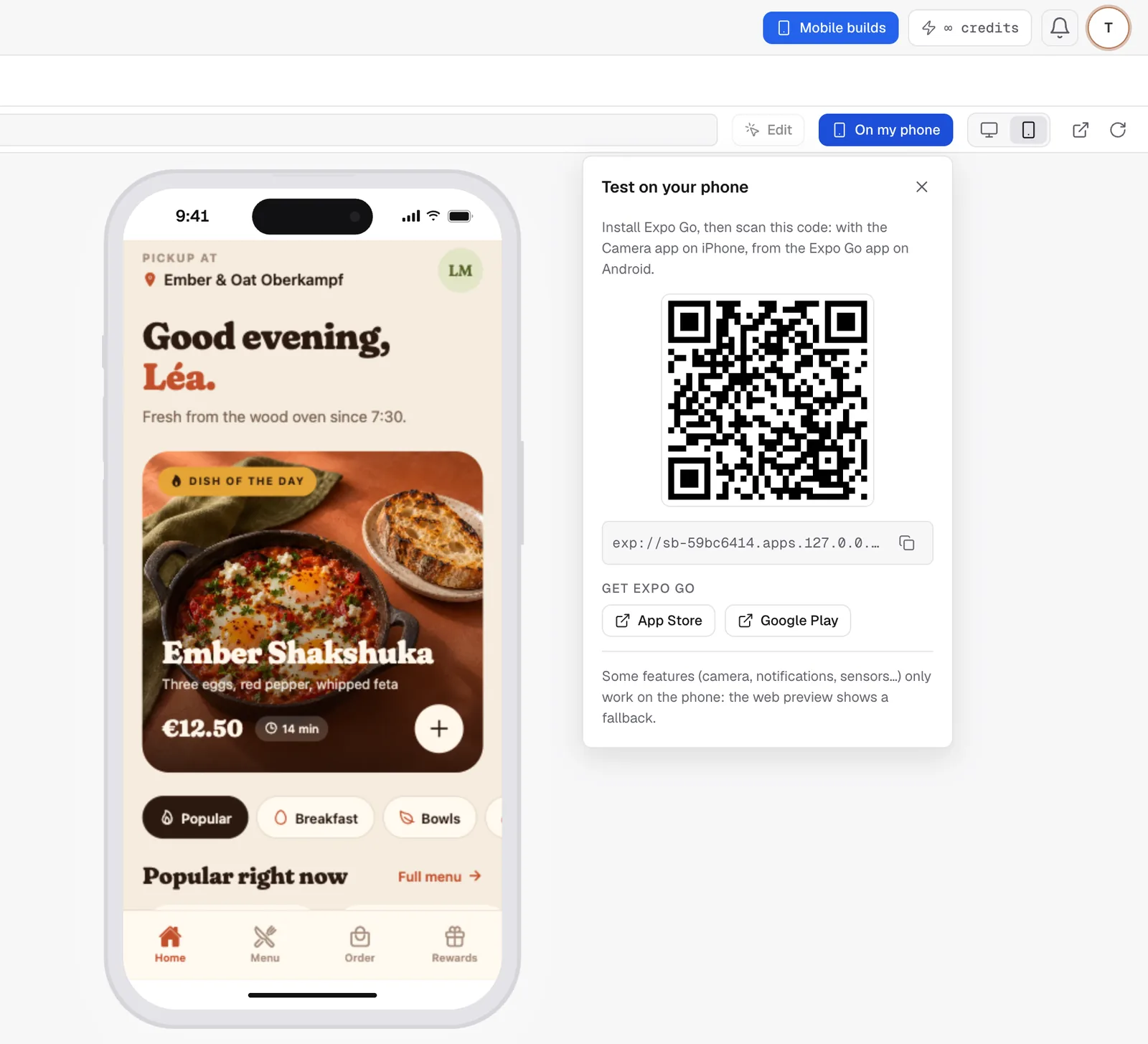
The preview is the web version of your app. Layout, screens, navigation, text, images, lists and forms look and behave as they will on the phone. A few features only exist on a real phone (camera, notifications, sensors): in the preview the agent shows a short message instead, and you test them on your phone.
What the agent builds
Your app is built with Expo and React Native, the tools used by many apps in the stores. One project gives you the iPhone app, the Android app and the preview, from the same code. The agent:
- creates the screens and the navigation between them (tabs, back button, lists, details);
- uses the phone's features when you ask for them: camera, photos, location, notifications, vibrations, local storage;
- asks for permissions with a sentence saying why, at the moment the feature is used;
- checks its work with screenshots at phone size, in light and dark mode.
The agent never writes a native Android project (Kotlin, Gradle) or iOS project (Swift, Xcode): FromScratch could neither preview nor build them. It stays within what Expo Go can open, so you can always test on your phone. A few third-party services with their own native code (some payment, advertising or Bluetooth kits) need a special build that is not available yet.
Note
asking for a phone app inside a website project? The agent will first explain your two options: make the website installable on the phone's home screen (a web app, in the same project), or create a new « Mobile app » project from the Home page for a real store app.
What changes in a mobile project
- The Publish button of the header becomes Mobile builds: it opens the Mobile section of the dashboard, where you build the app, send updates and publish to the stores.
- Sections that only make sense for websites (app users, data, domains, marketing, e-mails, API) are hidden from the dashboard. See The project dashboard.
- Versions work as usual: every change of the agent can be undone. See Versions: undo anything.
FAQ
Is it free?
Creating the app, the preview and testing on your phone work on every plan; each reply of the agent uses credits, as for a website. Builds and store publishing are part of the Starter and Pro plans. See Plans and the free tier.
Can I turn my existing website into an app?
Not inside the same project. Start a « Mobile app » project and describe the screens you want, or give the agent your website's address so it reuses your texts, colours and logo.
Related
Was this page helpful?
Thanks for your feedback!
Couldn't send your feedback. Please try again later.