Site visit statistics
How many visitors, on which pages, from where and on what device: the built-in cookie-free counter, plus your Google Analytics reports.
On this page
Every site published with FromScratch counts its visits on its own. There's nothing to install and no cookie banner to add. The numbers show up in Dashboard › Analytics from the first visits. If you also use Google Analytics, its reports can appear right below.
The FromScratch counter
- Publish your site. The counter only works on the published site, never in the preview.
- Open Dashboard › Analytics.
- Choose the period at the top right: 7 days, 30 days or 90 days.
- Click Refresh to reload the latest numbers.
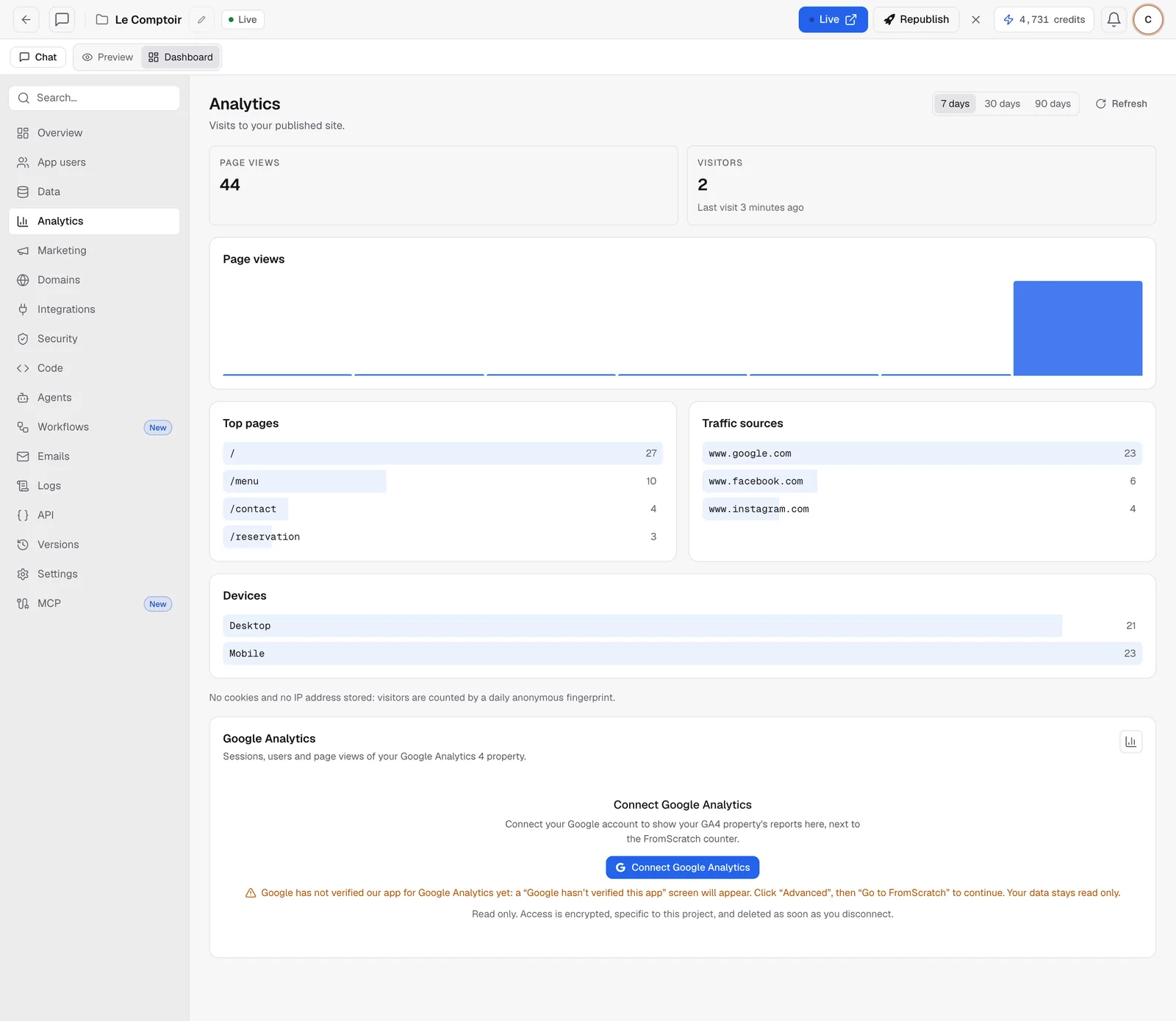
You can read:
- Page views and Visitors over the period, with the time of the last visit;
- Page views day by day;
- Top pages: the most visited addresses on your site;
- Traffic sources: where visitors come from (Google, Instagram, another site…). Direct visits, with no source site, aren't listed;
- Devices: computer, mobile or tablet.
Note
the counter sets no cookies and stores no IP addresses. A visitor is recognized by an anonymous fingerprint that changes every day, so the same person coming back the next day counts as a new visitor. Bots and automated browsers are ignored.
The counter is added at every publish. A site published before it existed starts counting after a new publish: click Republish.
Add your Google Analytics reports
If you have a Google Analytics 4 property, the Google Analytics card, below the counter, shows its reports without leaving FromScratch.
- In the Google Analytics card, click Connect Google Analytics.
- Choose your Google account and accept read access.
- Back in the dashboard, choose the property to show.
- Choose the period: sessions, users and page views with their trend, pages, sources and countries.
Warning
until Google has finished verifying FromScratch for Google Analytics, a "Google hasn't verified this app" screen appears. Click "Advanced", then "Go to FromScratch" to continue. Access stays read-only.
The card also offers a real-time view (visitors over the last 30 minutes, refreshed every minute while you're looking at it). If your project doesn't have a property yet, the Create the GA4 property for this site button creates one for you: see Tracking and pixels: GA4, Meta and TikTok.
Access is specific to this project, encrypted, and removed as soon as you disconnect the account (Dashboard › Integrations › Google account).
Reading the numbers correctly
- The two sources don't count the same way. Google Analytics needs your visitors' cookie consent, the FromScratch counter doesn't. It's normal for FromScratch to show more visits.
- Your own visits count too. For an accurate figure, look at a period when you weren't testing the site.
- The dashboard numbers also feed the autonomous agents: the weekly analytics report relies on them.
FAQ
My statistics stay at zero.
Check that the site is published and that you're looking at the right period. If the site was published a long time ago, republish it to add the counter.
Can I turn the counter off?
It's part of publishing and collects no personal data. If you need another tool, add it as well in Integrations.
Related
Was this page helpful?
Thanks for your feedback!
Couldn't send your feedback. Please try again later.