The "Built with FromScratch" badge and the showcase
Show or remove the small line at the bottom of your published site, and allow it to be featured on FromScratch's public showcase page.
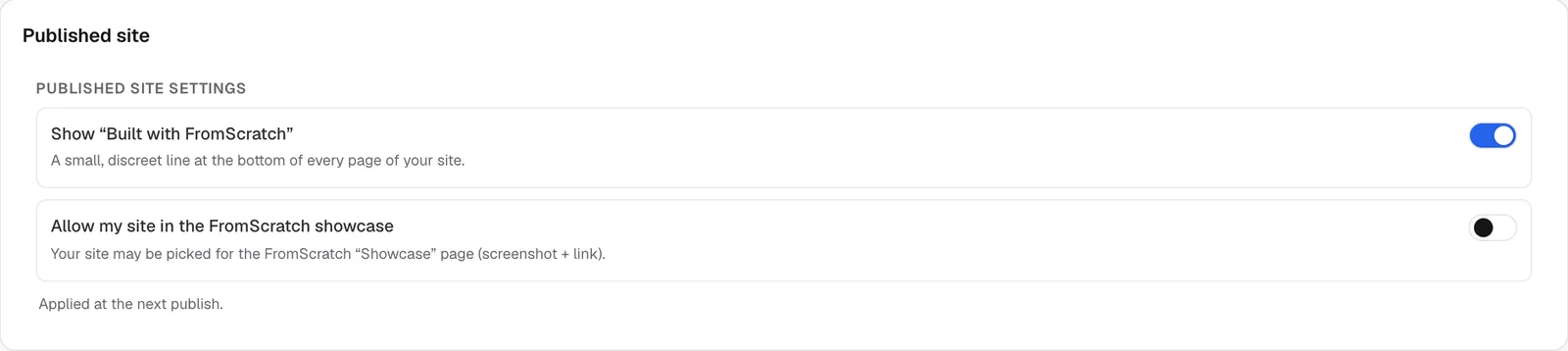
A site published with FromScratch can carry a small, discreet line at the bottom of every page: "Built with FromScratch". You can also offer your site for FromScratch's public showcase. Both settings are in Dashboard › Settings, in the Published site card.
The badge
The badge is a line of text at the bottom of the page that links to FromScratch. It adds no cookie and no tracking code, and it's written in your account's language ("Built with FromScratch" or "Créé avec FromScratch").
| Plan | Badge |
|---|---|
| Free | Always shown |
| Starter and Pro | Shown by default, you can remove it |
Remove or restore the badge
- Open Dashboard › Settings, then the Published site card.
- Turn off Show “Built with FromScratch” (or turn it on to bring it back).
- The setting is applied at the next publish: click Republish.
The dashboard's Overview also tells you whether the badge is shown or hidden on your site.
Note
on the free plan, the switch is locked ("Included on the free plan — upgrade to Starter to remove it"). If you go back to the free plan, the badge returns at your next publish. A site that's already live doesn't change until you republish it.
The badge doesn't appear if you asked the agent for a custom deployment file.
The FromScratch showcase
FromScratch's showcase page (/showcase/) presents sites built with the platform, with a screenshot and a link to each. It's a way to get your site noticed.
- In the Published site card, turn on Allow my site in the FromScratch showcase.
- Republish your site.
- The FromScratch team picks the sites to feature. When yours is chosen, the card shows "Your site is featured in the showcase."
Turning the option on gives your permission: it doesn't guarantee your site will be featured. Turn it off at any time to have it removed from the showcase.
FAQ
I removed the badge, but it's still there.
The setting applies at the next publish. Click Republish, then reload your site.
The badge gets in the way at the bottom of my page.
It's discreet and adapts to your site's colors. On a paid plan, you can remove it. Otherwise, ask the agent to leave a little space at the bottom of the footer.
Does the badge show in the preview?
No. It is only added to the published site, when the pages are served. Your site's code doesn't change, and the preview stays exactly as you build it with the agent.
Related
Was this page helpful?
Thanks for your feedback!
Couldn't send your feedback. Please try again later.